Bikes of Bentang Jawa: testing my AI workflow on something I wanted to use

cervelo aspero rose champagne
I’ve given up on the one-shot prompt. Two or three prompts is my current target.
My current setup pairs Claude Code with Codex. It also has Hindsight for shared memory and a bunch of MCP servers and skills. I wanted to see whether a few prompts could get a small project working.
Bentang Jawa gave me a reason to try it. When the race was getting exciting, I wanted to look at the bikes people were riding and find inspiration for an ultra setup. Tyres, gearing, bags, lights.
I’ve put miles into cycling, but my FTP still looks like a beginner’s and my longest ride so far is 100 km. Excellent qualifications for ultra, obviously. 🚲 I still wanted to try, so I wanted somewhere to compare what other riders were using.
That became Bikes of Bentang Jawa, where you can browse riders’ setups and explore equipment trends. The project repository is currently private while I prepare it for a public release. I wanted to use the site myself, so I had a reason to care about the result.
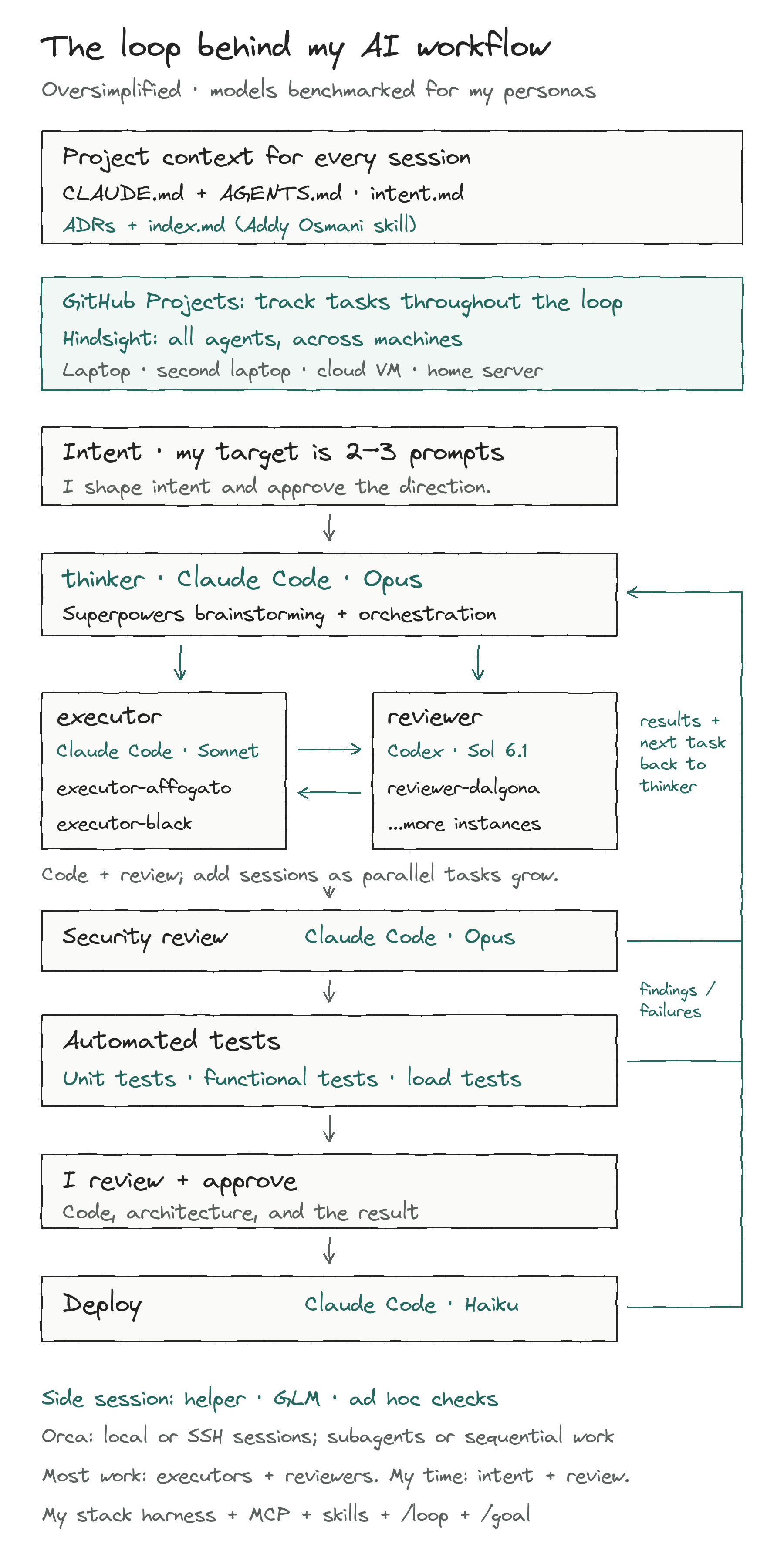
An oversimplified loop, with GitHub Projects tracking tasks and Hindsight sharing context across all agents and machines. Deployment returns to the thinker. Open the chart for a larger version.
What I wanted to test
Ideally, this would be a productive afternoon for everyone except me: I’d explain the idea, let the agents use the context they already had, and come back to inspect the implementation.
In practice, most of my time goes into the intent, approving directions, and reviewing code and architecture. Those discussions are still work.
Before I write a short prompt, the agents need access to the project and its tools, working conventions, and decisions from earlier sessions. I also want them to hand work to each other without me copying conversations between windows.
By two or three prompts, I mean my high-level instructions. The agents can still make tool calls and go through review loops, and later revisions add more work.
I still wanted the agents to be disciplined about scope, even if I had turned looking at bike parts into a workflow experiment.
Before the agents start building
I always start by creating CLAUDE.md and AGENTS.md with the project’s instructions. My two or three prompts apparently need paperwork. 😅 Those files give the sessions a common starting point.
I use intent.md for ideation and the Superpowers brainstorming skill to discuss the idea and plan the work before implementation.
I record every decision we reach in those discussions as an Architecture Decision Record (ADR), using Addy Osmani’s Documentation and ADRs skill. An index.md lists and links the ADRs. The agent reads that first, then opens the relevant records for the reasoning instead of going through every document.
Pairing Claude Code with Codex
OpenAI’s Codex plugin for Claude Code lets you ask Codex to review changes or take on a task from inside Claude Code. I still get to explain what I meant the first time. 🙃 The plugin uses the local Codex CLI, so both agents work with the same repository checkout on that machine.
To set it up, run these commands inside Claude Code:
1/plugin marketplace add openai/codex-plugin-cc
2/plugin install codex@openai-codex
3/reload-plugins
4/codex:setup
The setup check tells you whether you need to install or sign in to Codex. The plugin uses Codex’s authentication on that machine.
To try a review in the background:
1/codex:review --background
2/codex:status
3/codex:result
For implementation or investigation, /codex:rescue delegates a task to Codex. /codex:transfer lets you continue a Claude Code session in Codex. The plugin README documents the commands and their options.
The handoff is what I wanted: one agent can implement something and another can review it against the task and the repository. I read the changes and decide what to keep, with less conversation to move around myself.
Shared memory across agents and machines
Orca starts sessions on my laptop, my second laptop, a cloud VM, or a home server. I use Hindsight as shared memory for all of them: the thinker, executors, reviewers, helper, security review, and deployment sessions. I want to switch roles or machines without explaining the project again.
I call it permanent memory because it keeps useful context beyond a chat’s context window. I come back after a break and ask where we left off, with the confidence of someone who remembers any of it. What comes back still depends on what the workflow saved and what it retrieves.
Hindsight has operations to retain information, recall it, and reflect over stored knowledge. Through its MCP server, agents can access a particular memory bank.
Each session connects to the same Hindsight service and project bank. I configure the connection and authentication on each host. For MCP access, the documented endpoint pattern is:
1https://<your-hindsight-host>/mcp/<project-bank>/
Replace the host and bank with your deployment’s values and use its authentication. Hindsight’s coding-agent integrations for Claude Code and Codex provide setup instructions for those clients. The shared MCP endpoint gives the other agents a way to reach the same project bank.
I want the agents to recall relevant context before working and retain useful decisions afterward. Otherwise, I’ve configured another tool to sit there unused.
Shared memory carries the reasoning between sessions. I still want the agents to check recalled context against the repository, because the files can change.
MCP and skills around the work
MCP servers give the agents access to tools and information. Skills give them instructions for recurring work, such as inspecting a project, following its conventions, reviewing changes, and checking the result.
Much of my preparation goes into those instructions and connections. Somewhere in a plan to look at tyres, I gave myself an orchestration setup to maintain. 😅 By the time I write a short prompt, I want the agents to have enough context to work with the project.
I also have my own preferred stack, and I created a harness skill with instructions specific to that stack. I use it alongside the general skills.
Superpowers skills have been especially useful for planning, testing, reviewing, and verifying work. I also use Claude Code’s built-in /loop and /goal:
/looprepeats a prompt at an interval, which helps with recurring checks./goalkeeps Claude iterating toward a stated completion condition, with a limit on the number of turns.
I use those commands to keep the work going without writing another prompt for each check or iteration. The skills describe how to do the work and verify it. Anthropic’s guide to loops explains the distinction. /loop still needs the machine running it to stay on.
How Bikes of Bentang Jawa is built
The current repository has two parts: the website people browse and the pipeline that prepares its data. Design specs, implementation plans, and ADRs live alongside the code. The repository’s instructions describe thinker, planner, and executor sessions for design, planning, and implementation.
| Part | What it uses |
|---|---|
| Website | Svelte 5, SvelteKit, and TypeScript, prerendered with adapter-static |
| Local tooling | Bun for the site; Python 3.12+ managed with uv for the pipeline |
| Visuals | Svelte components with SVG/CSS charts; GSAP and ScrollTrigger for animation, with reduced-motion fallbacks |
| Data | Appwrite TablesDB, with committed JSON snapshots for the website |
| Checks and deployment | Vitest, Playwright, and pytest in GitHub Actions; Cloudflare Pages for hosting |
Appwrite holds the database. I had set out to compare bicycle parts and acquired a database to look after. SvelteKit builds from the exported JSON files, so the website doesn’t need to call Appwrite when someone opens a page.
The data takes this path:
 1DotWatcher scrape / Instagram harvest
 2                 |
 3        Raw files / review queue
 4                 |
 5           Human curation
 6                 |
 7          Curated records
 8                 |
 9       Appwrite -> JSON snapshot
10                         |
11                  SvelteKit build
12                         |
13                 Cloudflare Pages
There is also a local export directly from the curated records to the JSON snapshot, which needs no database credentials. CI builds from the committed snapshot and gates deployment on the site and pipeline checks. Pull requests get preview deployments; pushes to main deploy to production.
The third-party services do different jobs:
- DotWatcher and public Instagram posts supply bike-check material. Apify handles Instagram harvesting, with Bright Data as an additional path for filling gaps. Candidates go through human review before joining the curated data.
- OpenRouter supports an optional extraction step that suggests structured equipment fields from captions. Those suggestions still need validation and curation.
- Appwrite stores the curated data. Its API credentials belong to the pipeline, and the static site builds without them.
- Instagram’s official embed displays Instagram media; DotWatcher images stay linked to their source. The project keeps source credits and doesn’t rehost the photographs.
- Tally hosts the correction and bike-submission forms. RideWithGPS supplies the public race-route export used to generate the committed route data.
Browsing the site doesn’t trigger an Apify harvest or an OpenRouter call. Instagram embeds and the hosted forms still depend on their providers.
The site shows where equipment details are missing through its coverage indicators. I use the setups for inspiration; they don’t tell me which part will be best for someone else.
Moving the work beyond my laptop
I initially used Herdr. I wanted the agents to keep working while I’m sipping my cola on Nusa Dua beach in Bali. 🥤 That meant being able to run them outside the laptop I was carrying, whether on my second laptop, a home server, or a cloud VM.
That led me toward Orca. It has SSH worktrees for running agents on remote machines and a mobile companion for checking their progress and sending instructions from a phone.
Herdr’s current documentation describes remote access too. Orca fit what I was looking for: managing remote agents and checking in from my phone.
Each machine still needs to stay available and have the repository, tools, and access the agents need. Git carries the code changes; Hindsight carries project context between the sessions. The agents run on those machines while I am away.
The sessions inside Orca
Each terminal session has a role or persona and a model. This is an oversimplified version of my current flow.
I benchmarked the models against my agent personas before assigning them to roles, and I currently have subscriptions across Claude, Codex, and GLM. My setup includes:
| Session role | Agent and model |
|---|---|
| thinker: brainstorming and orchestration | Claude Code with Opus |
| executor: implementation | Claude Code with Sonnet |
| reviewer: code review | Codex with Sol 6.1 |
| helper: anything I want to check | GLM |
| Security review | A separate Claude Code session with Opus |
| Deployment | Claude Code with Haiku |
The thinker is where I brainstorm and orchestrate the work. I keep the GLM helper around for ad hoc checks. Most of the work happens in executor and reviewer sessions, with multiple instances of each. I give them coffee suffixes: executor-affogato, executor-black, reviewer-dalgona. Apparently managing terminal windows also needs a drinks menu. ☕ As the parallel tasks grow, I add sessions. Depending on the task, the work runs through subagents or proceeds sequentially.
I maintain the tasks in GitHub Projects. The loop starts with intent, then brainstorming and planning with the thinker. Executors implement the tasks and reviewers check the changes before security review.
The workflow runs automated unit tests, functional tests, and load tests. I use the test results and agent reviews when I review the code and architecture, then approve the result before the Haiku deployment session takes over. Deployment routes back to the thinker for the next iteration. Review findings and test failures also feed back into the work.
What I can say so far
Bikes of Bentang Jawa gave me a small project I cared about and a live result I can browse, share, and ask other cyclists about. For now, my contribution to ultra cycling is something I can browse sitting down; the ride longer than 100 km is still on the to-do list.
I didn’t run the same task with and without Hindsight, pairing, MCP, or skills, so I can’t say how much each contributed. I want to keep testing whether the setup helps me spend less time repeating context and moving work between agents. Two or three prompts is the target I’ll keep trying for.
I’ll write a separate post going deeper into the options for shared memory between agents and the orchestration tools I’ve tried. I’ll share what worked for me, what I’d recommend, and why.
On the cycling side, I am curious what still feels confusing or unnecessarily difficult when preparing to ride. Choosing parts, planning a route, or something else? That might give me a reason for the next experiment. 👀
References:
- Bikes of Bentang Jawa: the live project and its equipment coverage.
- Project repository (currently private): implementation, data pipeline, and curation process.
- Codex plugin for Claude Code: pairing setup, reviews, delegation, and session transfer.
- Hindsight: persistent memory, with MCP access and coding-agent integrations.
- Orca: agent workspace with SSH worktrees and a mobile companion.
- Herdr: the tool I initially used to manage the workflow.
- Superpowers: skills for planning, implementation, testing, review, and verification.
- Addy Osmani’s Documentation and ADRs skill: recording decisions, alternatives, and reasoning for future sessions.
- Anthropic’s guide to loops: how
/loopand/goalkeep work going and when each fits.